
Vibe Coding Adobe Edge Delivery Blocks with AI: Let the Robots Cook
December 19, 2025
There's a whole thing happening in dev land right now.
You've got the AI evangelists who asked a model to convert their janky WordPress site to React and now think they've achieved enlightenment. You've got the boomer doomsday crowd convinced nobody will know how to code in 5 years and the internet will implode. And then there are the quiet ones using AI to ship internal tools without telling anyone in 12 minutes and going home early.
I'm not in any of those camps. I'm in the camp of: AI is a tool. Use it. It's a fancy autocomplete with delusions of competence.
This post is me showing how I used AI to vibe code a new Adobe Edge Delivery Services (EDS) block and more importantly, how I fixed what it got wrong.
Learn From a Farmer
I grew up on a farm. Farm logic is simple:
If something breaks, you fix it.
No Amazon, just old barns full of so much stuff they are tilting. You don't have the luxury of ordering a replacement or time to learn how to make a perfect replica. You grab random metal scraps, a hammer older than the Civil War, and maybe some duct tape. You make it work. Improvise, Adapt, Overcome.
This is why barns accumulate a 150 years of tools and "potentially useful" objects. My dad would say: "You never know when you might need that."
Here's the point:
You don't need to know how to forge a piece of implement from scratch. But you DO need to know enough to fix it when it breaks.
Same with AI-generated code.
AI can generate the implement. You just need to understand it enough to repair, tweak, and upgrade it.
What Even Is Vibe Coding?
Vibe coding is the workflow we're all slowly admitting we do:
Describe roughly what you want -> let the AI cook -> fix the chaos -> ship.
It's not "prompt engineering." It's not "AI-powered development." It's literally vibes + context + taste + you.
I'm calling it "vibe coding" because that's what it feels like - you're not writing specs or following a rigid testing outline. You're vibing with the AI, getting something 80% there, then using your judgment and experience to make it actually good. It's collaborative improvisation with a very confident but occasionally wrong partner (we both are).
My Three Rules of Vibe Coding
- Explain the job like you're teaching someone who knows HTML but has the memory of a goldfish.
Be verbose. Over-explain. Pretend you're writing IKEA instructions. - Let the model do the rough cut.
The shape is there, you just need to sand it. - Fix the sketchy bits using your actual skills.
The model will do something cursed eventually.
My Experience with Models and Code Generation
I'm doing all this in Windsurf, because prompting + code in the same workspace is chef's kiss. There are other IDEs with AI baked in like Cursor or VSCode with GitHub Copilot - pick your poison. Windsurf has had competitive pricing and worked out of the box for me.
Claude Sonnet 4.5: King of giving usable first drafts without losing track of reality. I haven't done too much testing with Opus since Sonnet is faster and works for what I need.
GPTs: Great for natural language tasks like explaining things and writing docs, but in my experience takes too long and doesn't follow prompts as well.
DeepSeek: I trust it the same way I trust a raccoon in my kitchen.
Grok: Promising but no image input yet for Windsurf, so it's benched.
Gemini 2.5: Tried it. Got this on repeat: "I will add the task to my TODO list to keep you updated on my progress. I will start with creating the files. I will create the blog-featured-hero.js file first. After that, I will create the blog-featured-hero.css file.". At the time writing this Gemini 3 was not available but word on the street is it's spitting fire so I'll have to give that a try next.
If you really want to pull out your inner Terry Davis, you can go the self-hosted route with a decent rig (VRAM is king but you can offload some processing to RAM if needed, it’s quite slower, but it works). I recommend starting with Ollama - CLI or GUI (https://ollama.com/), throwing some custom models on there (I've had luck with gemma3:27b with natural language tasks - https://ollama.com/library/gemma3), and using a plugin in VS Code like Continue (https://github.com/continuedev/continue). You won't have all the functionality of the baked-in IDEs, but at least you know where your data's going. No, this isn't an ad.
Why EDS & AI Go Together Like PB&J
EDS blocks are ideal for AI drafting because:
- Blocks are literally HTML + CSS + vanilla JS.
This is what LLMs are trained on. Feed them raw HTML and context? They go brrrr. - EDS has clear patterns.
Models are literally built to spot patterns. It's what they do. - You (yes, YOU) control the final polish.
AI gives you 80%. Your brain gives you the last 20% that makes it not embarrassing.
Good prompts with clear examples = better output.
OK, Let's Build This Hero Block
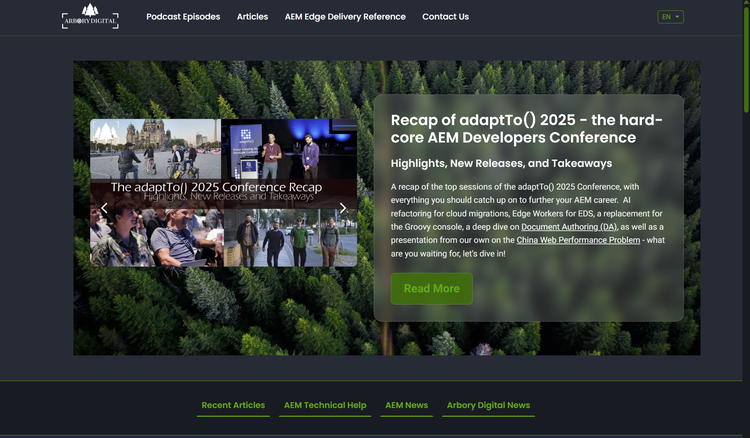
I want to make a new blog-featured-hero block for our blog with:
- Full-width background image
- An image carousel on the left
- A blurred-glass card with title + subtitle + description + "Read More" button
- Responsive + accessible
- Follows EDS patterns so Future Me doesn't hate Past Me
Here's what the raw Document Authoring block looks like:
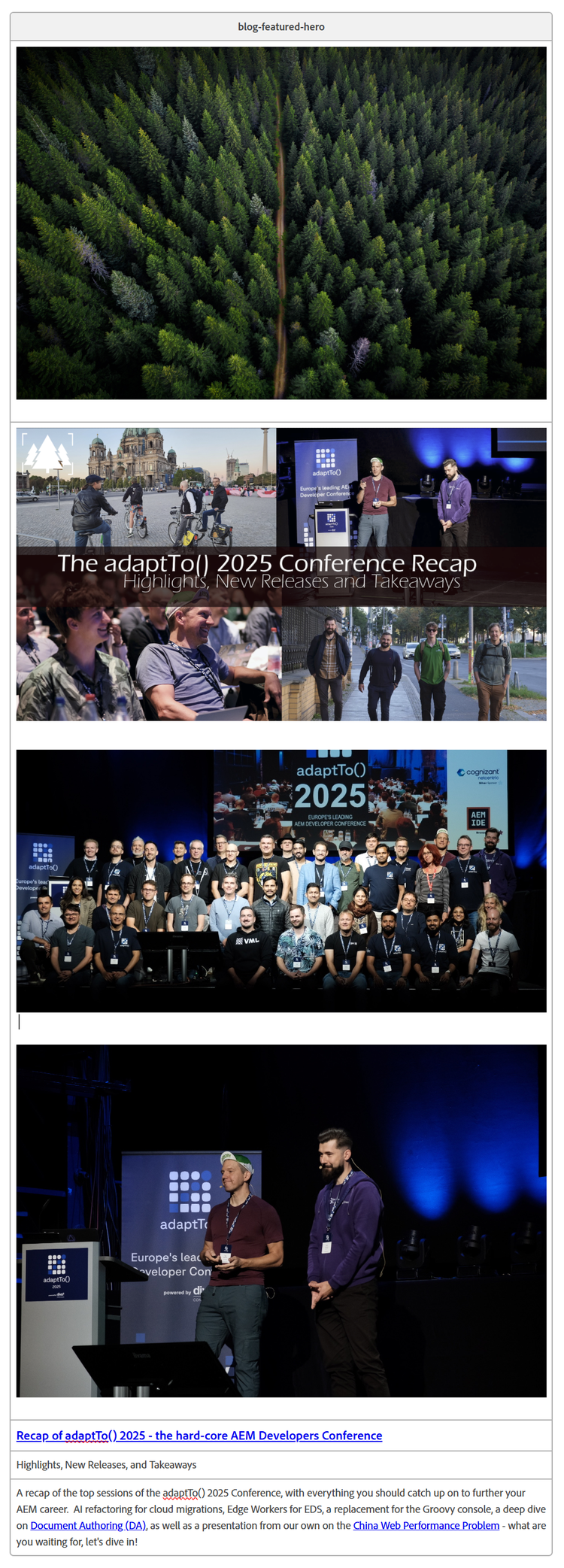
EDS turns that into raw pre-decoration HTML like this:
<div class="blog-featured-hero block" data-block-name="blog-featured-hero" data-block-status="loaded">
<div>
<div>
<picture>
<source type="image/webp" srcset="./media_121d14bf9bc80053370941b7efb0839f136015366.jpg?width=2000&format=webply&optimize=medium" media="(min-width: 600px)">
<source type="image/webp" srcset="./media_121d14bf9bc80053370941b7efb0839f136015366.jpg?width=750&format=webply&optimize=medium">
<source type="image/jpeg" srcset="./media_121d14bf9bc80053370941b7efb0839f136015366.jpg?width=2000&format=jpg&optimize=medium" media="(min-width: 600px)">
<img loading="eager" alt="" src="./media_121d14bf9bc80053370941b7efb0839f136015366.jpg?width=750&format=jpg&optimize=medium" width="5464" height="3640">
</picture>
</div>
</div>
<div>
<div>
<p>
<a href="/en/blog/adaptto-2025-recap" title="">
<picture>
<source type="image/webp" srcset="./media_1865dd437dcdfad78f768062737744b7e4c24211b.png?width=2000&format=webply&optimize=medium" media="(min-width: 600px)">
<source type="image/webp" srcset="./media_1865dd437dcdfad78f768062737744b7e4c24211b.png?width=750&format=webply&optimize=medium">
<source type="image/png" srcset="./media_1865dd437dcdfad78f768062737744b7e4c24211b.png?width=2000&format=png&optimize=medium" media="(min-width: 600px)">
<img loading="lazy" alt="" src="./media_1865dd437dcdfad78f768062737744b7e4c24211b.png?width=750&format=png&optimize=medium" width="2862" height="1583">
</picture>
</a>
</p>
<h3 id="">
<picture>
<source type="image/webp" srcset="./media_1b53b514e1567d66193ea852fa1dc964427605121.jpg?width=2000&format=webply&optimize=medium" media="(min-width: 600px)">
<source type="image/webp" srcset="./media_1b53b514e1567d66193ea852fa1dc964427605121.jpg?width=750&format=webply&optimize=medium">
<source type="image/jpeg" srcset="./media_1b53b514e1567d66193ea852fa1dc964427605121.jpg?width=2000&format=jpg&optimize=medium" media="(min-width: 600px)">
<img loading="lazy" alt="" src="./media_1b53b514e1567d66193ea852fa1dc964427605121.jpg?width=750&format=jpg&optimize=medium" width="1768" height="877">
</picture>
</h3>
<p>
<picture>
<source type="image/webp" srcset="./media_1bffd036fff3f8aa249bb6d392a905e4557c465bd.jpg?width=2000&format=webply&optimize=medium" media="(min-width: 600px)">
<source type="image/webp" srcset="./media_1bffd036fff3f8aa249bb6d392a905e4557c465bd.jpg?width=750&format=webply&optimize=medium">
<source type="image/jpeg" srcset="./media_1bffd036fff3f8aa249bb6d392a905e4557c465bd.jpg?width=2000&format=jpg&optimize=medium" media="(min-width: 600px)">
<img loading="lazy" alt="" src="./media_1bffd036fff3f8aa249bb6d392a905e4557c465bd.jpg?width=750&format=jpg&optimize=medium" width="1776" height="1184">
</picture>
</p>
</div>
</div>
<div>
<div>
<h3 id="recap-of-adaptto-2025---the-hard-core-aem-developers-conference"><a href="/en/blog/adaptto-2025-recap" title="Recap of adaptTo() 2025 - the hard-core AEM Developers Conference">Recap of adaptTo() 2025 - the hard-core AEM Developers Conference</a></h3>
</div>
</div>
<div>
<div>
<p>Highlights, New Releases, and Takeaways</p>
</div>
</div>
<div>
<div>
<p>A recap of the top sessions of the adaptTo() 2025 Conference, with everything you should catch up on to further your AEM career. AI refactoring for cloud migrations, Edge Workers for EDS, a replacement for the Groovy console, a deep
dive on <a href="https://blog.arborydigital.com/en/blog/what-is-document-authoring-for-edge-delivery" title="Document Authoring (DA)">Document Authoring (DA)</a>, as well as a presentation from our own on the <a href="https://blog.arborydigital.com/en/podcast/solving-china-web-performance"
title="China Web Performance Problem">China Web Performance Problem</a> - what are you waiting for, let's dive in!</p>
</div>
</div>
</div>
The Prompt
Here's the cleaned-up version of what I fed Claude (including the screenshot of DA):
Create an Adobe Edge Delivery Services (EDS) block using vanilla JavaScript and CSS.

## Block Requirements
**Name**: blog-featured-hero
**Purpose**: Featured blog hero with background image and content overlay

## Learn from Existing Blocks
Examine css and js file in /blocks/hero/, /blocks/columns/, /blocks/blog-post-hero/,
and /blocks/carousel/ for EDS patterns.

## Raw HTML from EDS (before our JS/CSS decoration)
[raw html here]

## Your Task
Transform this raw HTML into:
- Row 1 image becomes full-width background
- Overlay container with:
  - LEFT: Row 2 images as carousel with minimal navigation icons, no background just chevrons
  - RIGHT (glass card): Row 3 Title/Link, Row 4 Subtitle, Row 5 Description,
    Button "Read More" linking to Row 3 URL

## JavaScript Requirements
Parse the block's child divs (rows) and reconstruct into the layout above.
Use vanilla JavaScript only - no frameworks.
Handle missing rows gracefully.

## CSS Requirements
- Mobile responsive (stack on small screens)
- glass background on card
- high contrast mode

Generate blog-featured-hero.js and blog-featured-hero.css files.
The AI's First Draft
Claude kicked out both files. And honestly? It was pretty solid.
What Was Good
- The layout was basically correct
- Carousel worked
- Background image logic: handled
- Responsive stacking: handled
What Needed Human Hands
Still, it had problems:
- Visual Polish: Colors mismatched and the Typography could be freshened up
- UX Issues: Carousel wasn't autoplaying, No hover transitions on links or buttons
- Performance: Background Image Loading Improperly
- Layout: Left Column vertically aligned to the top of the div
So I got to work.
Polishing the Block (Where You Actually Earn Your Paycheck)
Overriding Global Styles
One thing I've noticed: Claude has no memory of your cascade. It generates rules that make total sense - until your global styles come and dismantle them.
EDS has global max-width + padding that choke sections to around 1200px. Claude's first draft didn't account for this, so the hero wasn't actually full bleed. Instead of !important-ing my way out of it, I increased specificity by prepending main to the selectors:
/* My fix - higher specificity wins */
main .blog-featured-hero-container {
  width: 100%;
  padding: 0;
  margin: 0;
}

main .blog-featured-hero-wrapper {
  width: 100%;
  max-width: 100%;
  padding: 0;
  margin: 0;
}

main .blog-featured-hero {
  position: relative;
  width: 100%;
  min-height: 500px;
  overflow: hidden;
}
Hero = full bleed. Cascade = unpolluted.
Visual Polish: Colors, Typography, Buttons
I swapped in our brand greens, tightened the typography and again fixed some specificity issues with the read more button. I wanted the button to look a bit more streamlined than our global option. I also added ease-in-out transitions on hover, as God intended.
/* Read More button */
.featured-content-card .featured-read-more {
  display: inline-block;
  padding: 0.5rem 1rem;
  background-color: var(--link-hover-color);
  color: white;
  text-decoration: none;
  border-radius: var(--border-radius);
  text-transform: uppercase;
  font-family: var(--heading-font-family);
  letter-spacing: -1px;
  font-size: var(--font-size-sm);
  font-weight: 600;
  transition: all 0.3s ease-in-out;
}

.featured-content-card .featured-read-more:hover {
  background-color: var(--link-color);
  transform: translateY(-2px);
  box-shadow: 0 4px 12px rgba(0, 0, 0, 0.3);
}
UX Fix: Carousel Timing
To fix the carousel not autoplaying, I added logic to:
- Auto-advance slides every 5 seconds
- Pause on hover and keyboard focus
- Restart after manual navigation
- Arrow key navigation
The autoplay only runs if there are multiple slides, and all the pause/resume logic ensures smooth UX without interrupting user interaction.
let autoplayInterval = null;

const startAutoplay = () => {
  if (autoplayInterval) return;

  autoplayInterval = setInterval(() => {
    const currentSlide = parseInt(carousel.dataset.activeSlide || '0', 10);
    showSlide(carousel, currentSlide + 1);
  }, 5000);
};

const stopAutoplay = () => {
  if (autoplayInterval) {
    clearInterval(autoplayInterval);
    autoplayInterval = null;
  }
};

// Pause on hover and focus
carousel.addEventListener('mouseenter', stopAutoplay);
carousel.addEventListener('mouseleave', startAutoplay);
carousel.addEventListener('focusin', stopAutoplay);
carousel.addEventListener('focusout', startAutoplay);

// Arrow key navigation
carousel.addEventListener('keydown', (e) => {
  if (e.key === 'ArrowLeft') handlePrev();
  if (e.key === 'ArrowRight') handleNext();
});

startAutoplay();
Performance
After building the block, I ran the page through Lighthouse. Performance score was 99 (this is EDS we're talking about), but there were still some minor optimizations to make.
The background image needed to load first, but without any priority hints, it was getting pushed down the waterfall. The fix was to tell the browser this image is important:
if (bgPicture) {
  const bgImg = bgPicture.querySelector('img');
  if (bgImg) {
    bgImg.setAttribute('fetchpriority', 'high');
    bgImg.setAttribute('loading', 'eager');
  }
  backgroundContainer.appendChild(bgPicture);
}
fetchpriority="high" tells the browser to prioritize this image over others, and loading="eager" ensures it loads immediately rather than waiting until it's about to enter the viewport.
For the carousel, I did the opposite - only the first slide loads eagerly, while the rest are lazy loaded since they're not visible right away.
Layout
Fixed the vertical alignment with align-items: center since the container uses flex and the children needed to be centered vertically.
.featured-carousel .featured-carousel-slides {
  display: flex;
  overflow-x: scroll;
  scroll-snap-type: x mandatory;
  scroll-behavior: smooth;
  -ms-overflow-style: none;
  scrollbar-width: none;
  align-items: center;
}
These are the details that separate "it works" from "it's actually good."
Final Result
Looking cleeean.
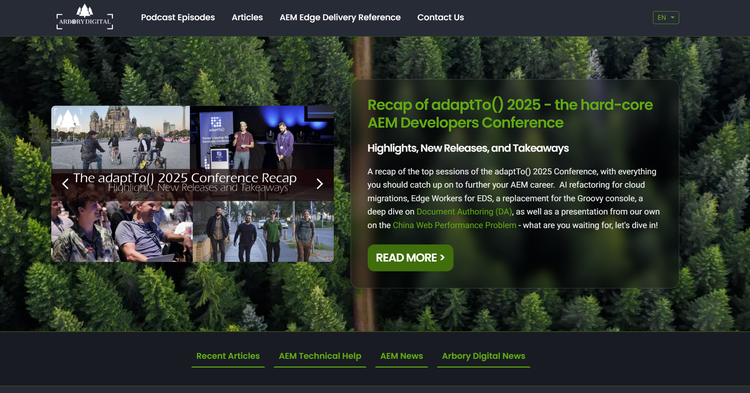
AI got me 80%. My tweaks got it to 100%.
Want to Try This Yourself?
Start small. Pick a simple block, maybe a card grid or testimonial slider. Feed Claude (or your model of choice) this structure:
- Tell the AI to look at 2-4 examples of similar blocks from your codebase
- Paste the raw HTML you're working with
- Describe the layout transformation in plain English
- Ask for vanilla JS and CSS (no frameworks)
Then open the browser console and actually test it. Look for:
- Timing issues (check for stacked timeouts)
- Layout Shifts/Performance Issues (Lighthouse will catch these)
- Color/spacing mismatches (your eyes will catch these)
Fix what's broken. Ship it. Repeat.
Side Note
I'm not the sharpest tool in the shed when it comes to Javascript but you know who is? The internet and that's what the AIs have been trained on. So if you ever get stuck or have no idea what's going on, lean on AI a bit to teach you. But remember to double check if or how real people have solved the problem in the past. You could just be overengineering a shovel. If the AI solution feels weirdly complex, it probably is.
Final Thoughts
AI code gen isn't going anywhere, and each new model gets faster and better. That's great for shipping routine work. Having a deep understanding of how a system works is more important than ever.
AI is a tool. Not magic. Use it like one.
Learn how the tractor works. Let the robot make the parts to fix it.
Want to dive deeper into Edge Delivery Services?
Explore how it can transform your content delivery by checking out our blog on Document Authoring for Edge Delivery or listen to our podcast discussion on YouTube.
About the Author

Frank Townsend
Front End Developer & A/V Ninja at Arbory Digital
Frank has a strong website development and design background. Before joining Arbory, he gained experience working at InstantOrder in design and development before pursuing freelance work. Eager for new opportunities, Frank transitioned to Arbory Digital, where he appreciates the collaborative and dynamic atmosphere. Outside of work, Frank’s hobbies include carpentry, photography, videography, farming, managing tours for the Always Loretta Show, and other side projects.

