

Know the 6 Ways to do Redirects on AEM and Edge Delivery Services
January 7, 2025
Understand the 6 Ways to Do Redirects on AEM and Edge Delivery
Redirects are a crucial aspect of web infrastructure, especially when managing content on platforms like Adobe Experience Manager (AEM) and Edge Delivery Services. Now that there is a brand-new pipeline-free redirects option for doing URL redirect maps in AEM / AEM Cloud Service, it's a good time to go over ALL of the various options at your disposal as they all have their own time, place and use case.
I cut a video (while mountain biking in the snow) to go over these various mechanisms and give context on why it's important to understand them.
The Importance of Redirects
Redirects serve multiple purposes in web management. They can help maintain site structure, manage legacy URLs, and ensure that users are directed to the correct content. Understanding the reasons for implementing redirects is essential for effective site management. Here are some common scenarios:
- Site Structure Changes: When major parts of a site are restructured, redirects ensure that users can still access content without encountering broken links.
- Vanity URLs: These are user-friendly URLs that can enhance marketing efforts, such as promotional pages.
- Legacy Redirects: As websites evolve, old URLs may need to be redirected to new structures to preserve link equity and user experience.
Types of Redirects in AEM
In Adobe Experience Manager, there are several methods to define redirects. Each method has its own use cases and implications:
1. Sling Mappings
Sling mappings allow you to define how the publisher responds to requests. This method requires the publisher to process the request, which can consume server resources. It is recommended to implement these mappings through code during deployment rather than making changes directly on the server.
There's a great blog post on this from Albin here, as well as from Nikhil here.
2. Redirects in Apache Configuration
Apache level redirects can handle complex scenarios, including deep regular expressions for specific conditions. Like sling mappings, these redirects should be done in code, and deployed & tested using your standard pipeline process, to ensure stability.
In AEM as a Cloud Service, these redirect rules are managed as part of AEM code and deployed via the Cloud Manager Web Tier config pipeline or Full-stack pipeline. Thus, your normal release pipeline is what you use to manage, deploy, and test these redirect rules.
3. CDN Redirects
Adobe's managed Content Delivery Network (CDN) enables redirects at the CDN tier. This method is advantageous for performance, as redirects occur closer to the client, reducing latency. These redirects can be configured based on client IP, country, or other conditional logic.
I wrote a blog post on Adobe Managed CDN redirects here, if you want more info.
As a note on CDN redirects on the Adobe Managed CDN, however, the entire configuration is limited to 100KB - so you'd want to keep the physical number of rules to a minimum that you put in this redirect config. The remainder would be handled further down the stack in Edge Delivery sheets, Apache, etc.
4. Edge Delivery Redirects
For edge delivery, redirects can be managed through simple spreadsheets or document authoring tools. This method allows non-technical users to update redirects easily, making it accessible for marketing teams. Version control is also available, allowing for quick reversion if errors occur.
Documentation on how to set up redirects on Edge Delivery is here.
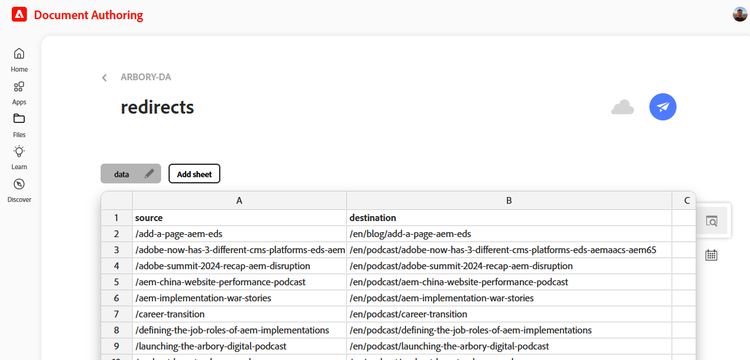
Sheets in Edge Delivery can easily handle many thousands of redirects in a sheet, but are not quite as robust as Apache rewritemaps as covered below.
5. Apache Rewrite Maps & Pipeline-Free Rewrite Deployment
Many organizations face the challenge of managing legacy redirects due to multiple redesigns and infrastructure changes. A new pipeline-free redirect method allows for the management of large redirect maps through a text file stored in the AEM repository. This method simplifies the process of updating and maintaining legacy redirects.
This also allows rewrites maps to be placed in the hands of people who update them, in a simple text file format that can be stored & deployed inside of AEM.
One should additionally note that this mechanism is the best suited of all of them to do LARGE volumes of redirects. Each individual text file is limited to a theoretical max of 1GB, which only a madman would make a rewrite file that large and such an individual should most likely seek better life choices. One could, however, quite easily take multiple different divisions of redirects (legacy redirects, marketing rewrites, vanities, etc) and give them their own text files with their own permissions.
This pagedescribes how to implement pipeline free rewritemaps in AEM as a Cloud Service.
6. Vanity URL Properties
AEM also provides a property for managing vanity URLs, which can be beneficial for marketing campaigns. This method allows for easy updates and management of user-friendly URLs.
Considerations for Implementing Redirects
When implementing redirects in AEM, several factors should be considered:
- Performance Implications: Determine whether redirects should be processed at the application server or at the edge for optimal performance.
- User Access: Decide if non-technical users should have the ability to update redirects or if changes should be restricted to technical staff during deployment.
- Legacy Management: Plan for the management of legacy URLs to ensure that old links continue to function and maintain their SEO value.
Rewrites Overview
From Adobe's URL Rewrite documentation:
Managed & deployed as AEM project code | Ability to change by marketing/content team | AEM as Cloud Service compatible | Where redirection execution happens | |
|---|---|---|---|---|
At Edge via AEM-managed CDN | ✔ | ✘ | ✔ | Edge/CDN (Built-in) |
At Edge via bring your own CDN (BYOCDN) | ✘ | ✘ | ✔ | Edge/CDN (BYOCDN) |
Apache | ✔ | ✘ | ✔ | Dispatcher |
ACS Commons - Redirect Map Manager | ✘ | ✔ | ✔ | Dispatcher |
ACS Commons - Redirect Manager | ✘ | ✔ | ✔ | AEM / Dispatcher |
The | ✘ | ✔ | ✔ | AEM |
Conclusion
Redirects are a vital component of web infrastructure, particularly in Adobe Experience Manager and Edge Delivery Services. By understanding the different methods available and the considerations involved, organizations can effectively manage their redirects to enhance user experience and maintain site integrity. As you plan your AEM implementation or migration, take the time to evaluate your redirect strategy to ensure a smooth transition and ongoing performance.

Tad Reeves
Principal Architect at Arbory Digital
AEM Architect & DevOps guy with 14 years experience on AEM/CQ and 25+ years in systems infrastructure. He’s been mountain biking longer than he’s been doing system administration, and though originally from Maine, makes his home in the mountains of Northwest Georgia.
Like what you heard? Have questions about what’s right for you? We’d love to talk! Contact Us

