
Guide for Migrating AEM Edge Delivery from File-Based Configs to the Configuration Service
January 25, 2026
Note: this is a somewhat more-advanced topic on Edge Delivery Services & Document Authoring. For an intro on EDS & Document Authoring, please check this out first for context.
Background on File-Based AEM Edge Delivery Configs & Config Service
When Adobe first launched Edge Delivery Services (or Helix as it's known internally), all of the major site-wide configuration was done using configuration files checked into the site's repository. Deploying a new configuration was done by pushing to the main branch of the repo, which would push that configuration live on the site. A drawback of this was that any given repository had to be tied directly to a site and a document repository. You couldn't then have a single code repository drive multiple sites - or even multiple versions of a single site (like dev/stg/prd style environments for content or config staging).
As a result of this, and other technical concerns, Adobe has been moving to a new architecture design based around the Configuration Service. In this paradigm, configurations are centrally stored and versioned by Adobe in their API-driven Configuration Service, and once migrated to this service the files in your Edge Delivery project will no longer have any effect on the site.
Prerequisites to Moving to Config Service
As noted on https://www.aem.live/docs/config-service-setup#prerequisites, before you start the move to Config Service, you need to first ensure that your Adobe user is mapped as an admin for your Github org, so that you have authority in the Config Service to make changes. Your Adobe technical contact you generally deal with should be able to get you hooked up on this.
Endpoints & Configuration Surfaces Affected by a Move to Config Service
This affects the following configuration surfaces in an Edge Delivery project:
-
Content Bus Mapping: The configuration in
/fstab.yamlwhere the project maps to a location either in DA (or elsewhere, like AEM/Universal Editor or Sharepoint) is now in the Config Service. This is the most critical bit which allows for a single repo to drive multiple sites (formerly known as a "repoless" setup, as it meant that the code repo and content repo were not inextricably linked). -
Query Indexes: The index configuration for all languages was previously stored in the project in
/helix-query.yaml -
Sitemap configuration: The sitemap configuration formerly made in
/helix-sitemap.yamlwill now be in the Config Service. -
Sidekick Configuration: There are two different types of Sidekick configs which were formerly kept in the git project, that are now elsewhere.
- DA Plugins: Formerly, in the early days of DA, we kept DA plugins in the
/tools/sidekick/config.jsonfile in the code repo. This would be for things like the assorted DA UI enhancements like our date picker, AEM Tags plugin, etc. This is now kept in theLibrarysheet in DA config in DA itself, rather than in the codebase. - Sidekick Plugins/Config: Other AEM Sidekick configuration, such as configuration for Quick Edit, or for AEM Experimentation, is now kept straight in config service, rather than in DA. The Sidekick config in the EDS git project no longer will have any effect.
- DA Plugins: Formerly, in the early days of DA, we kept DA plugins in the
-
HTTP Headers Config: This was formerly kept in the
headerssheet of DA, but now will be pushed into config service. This is for CORS configuration like sticking anaccess-control-allow-originheader on certain hosts. -
Helix Preview/Publish Authentication: For authenticated Preview/Publish access control, we've been using a sheet-based authentication model, where you'd have a
datasheet inhttps://da.live/sheet#/[orgname]/[sitename]/.helix/config, in which we list theadmin.role.authororadmin.role.publishroles for individual Adobe entity IDs that map to user/profiles. This is now scrapped with Config Service, and users are managed directly in Config Service for these preview/publish roles, but also for access requests. Also, previously, authenticated publishing required that you used an illegible Adobe profile/user id like "6F221EA9667974FE0A495FD7@c23e2a2e62229a46496fae.e" that would be mapped to a user's login with a specific org. Now in Config Service, Helix will let you use your email address instead of the unintellible entity ID, and will even allow users to "request access" when they run into preview/publish issues, which will then surface to an admin interface app in DA to approve/deny access requests. -
Robots.txt Configuration: This was formerly kept in
/robots.txtin the git project, but now is configured in Config Service. -
CDN Configuration: This was previously kept in the
.helix/configsheet in DA, but now is pushed into Config Service. This would be for setting values like:- cdn.prod.host
- cdn.prod.type
- cdn.prod.serviceId
- cdn.prod.authToken
Steps for Moving an Existing File-Based Edge Delivery Site to Config Service
There is a migrate command in the AEM Admin (Helix) API which allows you automatically migrate a file-based Edge Delivery setup over to Config Service. There are some caveats though, so here's what to know about this.
First, let's assume you have an existing site that was created on DA using file-based configuration (I know I have a few such sites, I might be in the minority, but this is my blog post - you will want to re-evalutate steps for your own use case).
Steps:
-
Make sure you are admin for your org: As noted above, work with Adobe to make sure that you have
adminon your Github org. Validate this by going to https://tools.aem.live/tools/site-admin/index.html and then log in. If it works correctly, you should see a successful 200 request forhttps://admin.hlx.page/config/[orgname]/sites.json -
Grab your auth token: Do a shift+ctrl+I or shift+cmd+I to pop up developer tools, and look at that
sites.jsonrequest noted above. If you open the network tab, and look at Headers, you'll see anx-auth-tokenvalue. Copy that value, as that's the bearer token you'll need to use for the following API requests to interact with the AEM Configuration Service. -
Make a Copy of Your Site: It's a good idea to do a test-run on your site (the one with file-based configs) so that you can test this process before you run it on prod. Create a new EDS repo & site and populate it with the same codebase as your current site (if you don't have a dev repo already). Ideally, also, populate a dev content source so that you have a fully-armed and operational sandbox to mess about with.
-
Run the Migrate Command Dry-Run: Run the following command, which will do a dry run of the migration from file-based to Config service:
curl --request GET --url 'https://admin.hlx.page/config/{my-org}/sites/{my-site}.json?migrate=true&validate=true' -H "Authorization: token $MY_AUTH_TOKEN_NOTED_ABOVE"
If this works, it will spit out validation text like the following, which will tell you whether or not it will work to migrate this. In my case here, it means I'm NOT ready to migrate and have things to fix:"error": "validation failed.", "message": "/sidekick/plugins/0/environments/0 must be equal to one of the allowed values; /sidekick/plugins/2/environments/0 must be equal to one of the allowed values",
Also, if you get a 400 bad request on your invocation, you can also use thex-errorheader in the HTTP response which will also tell you about any problems in the migrate dry-run request: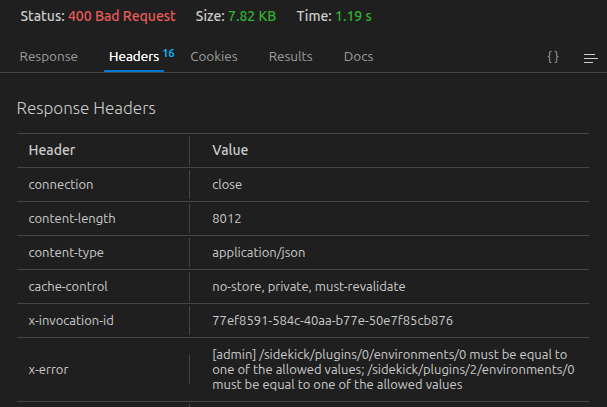
In this case, the error is telling me that in my list of AEM Sidekick plugins, the first plugin in
/tools/sidekick/config.jsonis invalid, as configuring a plugin in this way is no longer supported in Config Service. In this example, I need to migrate this plugin into the DA Library sheet for DA plugins.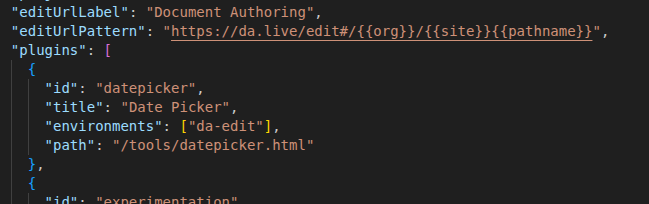
-
Fix any Validation Issues as noted above: You'll need to go through and fix any issues that come up, and then re-run your validation request.
Take any existing plugins defined as Sidekick plugins in the project, and put them in DA. In the case of Sidekick plugin issues like this, DA plugins would instead be configured inhttps://da.live/config#/[orgname]/[sitename]/in the "library" tab of the sheet.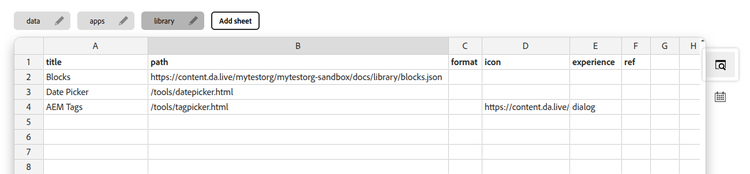
Or another issue like this:
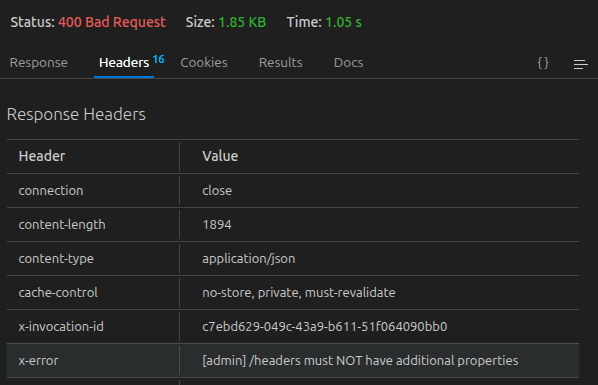
This indicates that we had some illegal properties in our headers that aren't supported anymore (or perhaps were never supported, and just weren't breaking anything so were left in there mistakenly).
Once those issues are handled, you're ready to run the migration itself. -
Push/Migrate the clean & validated config to Config Service: To push the config, use the following command:
curl --request POST --url 'https://admin.hlx.page/config/{my-org}/sites/{my-site}.json?migrate=true' -H "Authorization: token $MY_AUTH_TOKEN_NOTED_ABOVE"
Essentially the same command as above, but with aPOSTinstead of aGET. This will migrate you to config service. -
Push your Sitemap and Index configurations to Config Service: The migration command above will pick up all of your file-based configurations in your project EXCEPT for your sitemap configuration and your index configuration. You'll need to push these separately into config service.
To push your Index config YAML:curl -X POST -H "Authorization: token $MY_AUTH_TOKEN_NOTED_ABOVE" -H "Content-Type: text/yaml" -d ./helix-query.yaml "https://admin.hlx.page/config/{my-org}/sites/{my-site}/content/query.yaml"
To push your Sitemap config YAML:curl -X POST -H "Authorization: token $MY_AUTH_TOKEN_NOTED_ABOVE" -H "Content-Type: text/yaml" -d ./helix-sitemap.yaml "https://admin.hlx.page/config/{my-org}/sites/{my-site}/content/sitemap.yaml" -
Validate: There are a few things to immediately validate once you migrate.
- Validate Indexes: Go to https://tools.aem.live/tools/index-admin/index.html and validate that your indexes got pulled in properly
- Validate Sitemaps: Go to https://tools.aem.live/tools/sitemap-admin/index.html and validate that all of the sitemaps came through
- Validate users: Go to
https://tools.aem.live/tools/user-admin/index.html?org={orgname}&site={sitename}and make sure your Preview/Publish users are showing up there. - Validate users in DA: Go to
https://da.live/apps/aem-permissions#/{orgname}/{sitename}which will let you see a user-friendly list of preview/publish permissions as they're exposed to DA. This is also where you'll now be able - Validate Preview/Publish: When logged-in as a user with preview/publish permissions, make sure that you still have the ability to preview/publish appropriately. Get a user who does NOT have access to preview or publish, and ensure that it's locked-down appropriately.
- Validate a change to Sitemap & Index configs: make a non-breaking change to your sitemap and index configs, and make sure they are reflected on the tools.aem.live console.
- Any other miscellaneous validation you feel is needed for your site.
-
Burn-in: QA & burn-in with the team, fix any other preview/publish issues that come up, and let the new configuration burn in for at least a week to flush out any other issues that might arise.
-
Clean up config files: Once burn-in is complete, you'll no longer have need for your in-repo configs, and you can start retiring these one-by-one. I'd recommend persisting clean copies of your current configs down to git for versioning, just for DR purposes, in case someone makes an errant API request that for whatever reason cannot be undone.
IMPORTANT: If you missed any of the steps above, such as not pushing your helix-query.yaml or sitemap config files to the config service, as soon as you remove your files it will BLANK OUT YOUR INDEX CONFIGURATION. So, be doubly sure you have tested making an index update using config service before you remove files, and DOUBLE CHECK all of your configurations immediately after cleaning up config files & pushing to main.
Notes on CI/CD Implications of Config Service
A note here on CI/CD: Now that you have the inherent flexibility of an API-driven configuration service, you now also have the drawback that your git-driven CI/CD no longer has any effect.
The good news is there is some tooling like the Version Admin for keeping track of config changes and who makes what change:
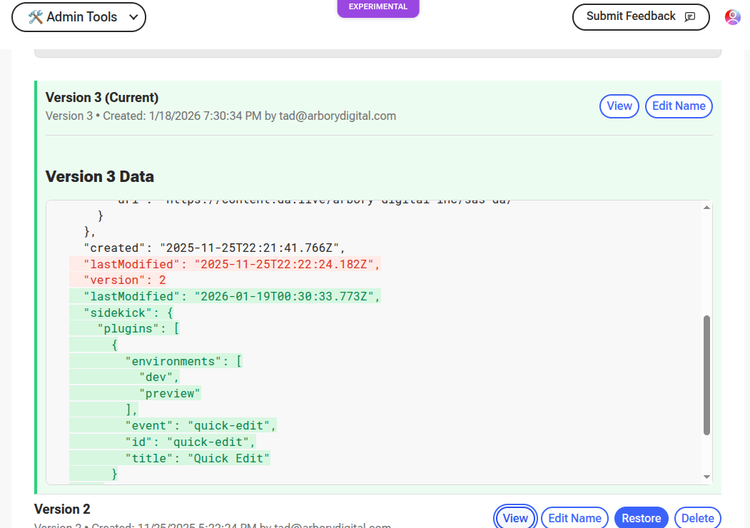
The bad news is that this removes the in-built, pull-request-centric CI/CD framework we've all come to know and absolutely adore in Edge Delivery. So, if you have situations where you want a junior engineer to propose changes, it will be significantly more tricky for them to give you a pull request that demonstrates that their configuration change is safe to roll-forward.
It's made more tricky by the fact that authorization for the API is based around your current logged-in user, which makes it slightly resistant to trying to integrate in a persistent set of keys into a CI/CD pipeline. I'm sure it can be done, it's just going to take some tinkering.
So, for this (at this writing) you'll need to roll your own CI/CD process that you feel comfortable with, for the size and make-up of your organization.
Hope this helps, and please drop a line if you've got trouble with any of this!
About the Author
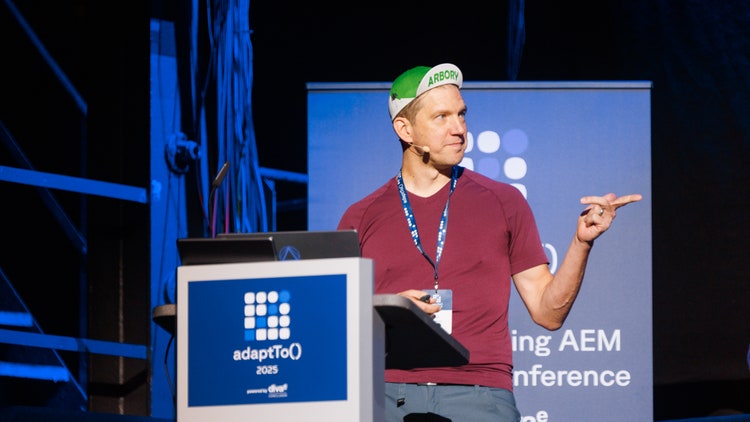
Tad Reeves
Principal Architect at Arbory Digital
Tad is a two-time AEM Champion, and has been working with Adobe Experience Manager & CQ since 2010. Starting in 1996, he has worn nearly every hat in website delivery from solution architecture to product management, as well as years in devops and system administration. He loves that Arbory Digital gives him the opportunity to provide honest and effective solutions, even if it means challenging prevailing sales perspectives. When Tad isn’t working (and sometimes when he is), he enjoys mountain biking and exploring nature with his wife & 3 kids.
Like what you heard? Have questions about what’s right for you? We’d love to talk! Contact Us

